
Introduction
If you’re setting up a home studio in a spare bedroom, a corner of the living room, or any compact space, the desk you pick is a bigger decision than most people realize. It’s your command center. Get it wrong, and you’ll fight workflow issues, ergonomic aches, and cable chaos for years. Get it right, and your creative process flows without friction.
This guide is for producers, beatmakers, podcasters, and audio engineers who need a studio desk for small space setups. We’re not talking about massive 72-inch producer consoles with 20U of rack space. We’re talking about desks that fit in rooms where every inch matters, where you need to balance gear footprint with actual working room for a keyboard, mouse, and monitors.
Let’s set one expectation up front: no desk is perfect for everyone. Every design involves trade-offsâdepth versus rack space, affordability versus build quality, modularity versus simplicity. The right choice depends on your specific gear, your room dimensions, and your workflow. This guide breaks down the top options with the kind of honest, practical advice you’d get from a veteran producer who’s already made the mistakes so you don’t have to.
What to Look for in a Small Space Studio Desk
Before diving into specific models, you need to understand the key factors that separate a good small-space desk from a frustrating one. Here’s what matters most:
Depth (Monitor Distance)
This is the most overlooked spec. A desk that’s too deep (say, 36 inches or more) pushes your monitors too far away in a small room, causing you to lean forward or strain. A desk that’s too shallow (under 20 inches) forces your eyes uncomfortably close to the screen. For most small studios, a depth between 24 and 30 inches is the sweet spot. It gives you enough room for a 24-27 inch monitor on an arm while keeping your ears at an optimal listening position relative to nearfield monitors.
Width (Gear Fit)
Measure your room width and subtract about 6 inches for chair clearance on each side. The remaining number is your maximum desk width. In tight spaces, 48 to 55 inches is typicalâwide enough to hold a laptop or monitor, an audio interface, and a pair of studio monitors on stands, but narrow enough to leave breathing room.
Cable Management
In a small room, cable spaghetti isn’t just uglyâit’s a workflow killer. Look for desks with built-in cable troughs, grommet holes, or rear channel runs that let you route power and audio cables cleanly. For those dealing with tangle-prone setups, a practical solution is to use a cable management sleeve to bundle everything together. Desks that ignore cable management will frustrate you every time you need to swap gear or reconfigure.
Height Adjustability
Fixed-height desks make it harder to dial in proper ergonomics, especially if you share the studio or switch between sitting and standing. Adjustable-height options like standing desk frames add flexibility, though they often sacrifice built-in rack space.
Rack Space
If you own outboard gearâcompressors, channel strips, synth modules, patch baysâyou need standard 19-inch rack rails. In small desks, you’ll typically see 4U to 14U. More rack space means less desk surface, so decide early which is more important for your workflow.
Common Mistakes When Buying a Desk for a Small Studio
I’ve seen producers burn hundreds of dollars on desks that simply didn’t work in their space. Here are the most common mistakes and how to avoid them:
1. Buying Too Deep
A desk that’s 36 inches deep might look spacious in a showroom, but in a 10×10 room, it eats up floor space and forces your monitors to sit too far away. You end up cranking the volume to compensate, which causes ear fatigue and poor mix decisions. Fix: stick to 24-30 inch depth for small rooms.
2. Ignoring Monitor Arm Compatibility
Many small desks have thick desktops or awkward edges that make it impossible to clamp a monitor arm. If you plan to use an armâand you shouldâcheck the desk’s edge clearance and thickness before buying. Some desks are flat-out incompatible.
3. Underestimating Cable Clutter
Desks without dedicated cable management channels turn into a nest of power bricks, audio snakes, and USB cables. This isn’t just uglyâit introduces noise interference and makes it hard to troubleshoot. Always prioritize desks with rear cable troughs or at least grommet holes.
4. Forgetting Chair Clearance
In a small room, you need enough space to roll your chair back or swivel. If your desk is too wide or placed too close to a wall, you’ll feel cramped. Measure your chair’s turning radius and add 6 inches on each side of the desk.
5. Thinking ‘Smaller Always Works’
An ultra-compact desk (say, 36 inches wide) might seem perfect, but if it can’t hold your interface, laptop, and a keyboard comfortably, it’s worse than no desk at all. Function should trump size. Find the smallest desk that actually fits your gear, not the smallest desk you can find.
1. Output Platform â Best for Modular Flexibility
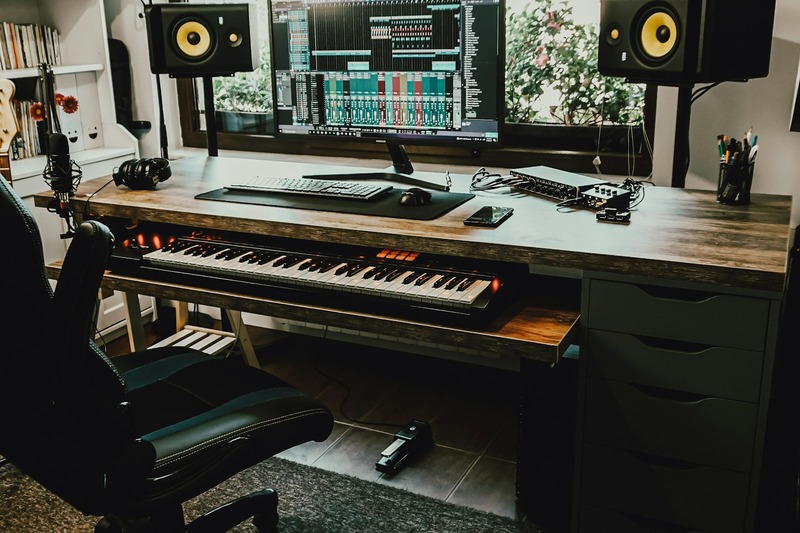
The Output Platform is one of the most thoughtfully designed studio desks for small spaces. It measures 30 inches deep by 55 inches wideâcompact enough for most bedrooms but deep enough for a 27-inch monitor on an arm. The defining feature is the modular front keyboard tray, which slides out to put your MIDI controller or mouse at the perfect height, then tucks away when not in use.
Cable management is excellent: the desk has a rear channel that routes cables from the rack area down to a clean exit point. It also includes 12U of rack space, though these are side-mounted rails rather than a full front-facing rack. If you need to mount a deep synth module or compressor, you’ll face some limitations. But for a small setup with an interface, patch bay, and a couple of units, it works well.
The build quality is pro-gradeâheavy MDF with a durable laminate finish that won’t scratch easily. Assembly is moderate; plan on a couple of hours with a friend. The biggest downside is price. The Platform sits at a premium tier. You’re paying for design and modularity, not raw rack space.
Best for: producers who prioritize a clean, professional look, need flexible monitor positioning, and can live without massive rack capacity. If you work mainly in the box and only need room for an interface and a few units, this desk is hard to beat.
Check the current price on Amazon.
2. Studio RTA Producer Station â Best for Rack Gear
The Studio RTA Producer Station is the workhorse of small studio desks. It’s available in configurations with 10U or 14U of standard 19-inch rack space, making it ideal if you own multiple pieces of outboard gear. The desk width is typically around 48 inches, with a depth of 28 inchesâtight but workable for a 24-inch monitor on an arm.
Build quality is solid: the desk uses thick MDF with a laminated finish that resists scratches. Cable management is basic but functional, with a rear channel that keeps power and audio cables organized. The keyboard tray is retractable and can hold a 49-key controller comfortably.
The main trade-off is assembly. This desk is heavy and requires a significant time investment to put togetherâexpect 2-3 hours at minimum. Also, the depth, while adequate, is tight for deeper monitor arms or a large interface with rear-facing connectors. You may need to mount your interface on the rack rails rather than the desk surface to save space.
Best for: producers with outboard gearâcompressors, channel strips, synth modules, or patch baysâwho need easy access to rack units. If you’re running a hybrid workflow with analog gear, this desk offers the best rack-to-footprint ratio in its price range.
Check the latest deal on Amazon.
3. 60/40 Aeronaut â Best Ultra-Compact Option
The 60/40 Aeronaut is designed for the tightest of spaces. At just 24 inches deep and 48 inches wide, it’s one of the smallest full-featured studio desks on the market. The design is deceptively simple: a solid wood desktop with a built-in rack shelf on the rear half, allowing you to mount up to 4U of gear without taking up desk surface area.
Cable management is handled by a rear cable tray that keeps power bricks and audio cables off the floor. The desk surface is large enough for a laptop and a small audio interface, but you’ll struggle to fit a second 27-inch monitor alongside a full-size controller. That’s the trade-off of going ultra-compactâyou get floor space back, but you lose desktop real estate.
The build quality is good for the price. It uses solid wood from sustainable sources, and the finish is smooth and resistant to wear. Assembly is straightforward, taking about an hour solo.
My practical advice: use monitor arms to free up desk space. Clamp a dual-arm mount for your laptop and a small secondary display, and you’ll maximize what this desk offers.
Best for: laptop-based producers, minimalists, and anyone working in a room under 8 feet wide. If you don’t need a lot of rack space and value a tiny footprint, the Aeronaut is a smart choice.
4. Z-Studio Desk by Z-Industry â Best Budget Pick
The Z-Studio Desk by Z-Industry is the go-to option if you’re starting out or building a second studio on a tight budget. It typically runs under $300, offering 10U of rack space, a sliding keyboard tray, and a compact footprint around 44 inches wide by 27 inches deep.
Material quality is what you’d expect at this price point: particle board with a laminate finish. It’s not going to survive a move without some care, and the cable management is basicâa few grommet holes and a rear channelâbut it gets the job done. For a beginner who needs a dedicated rack for an interface and a patch bay, this desk provides the essential structure.
The keyboard tray holds a 49-key controller, though it’s a bit shallow, so a deep controller might overhang. The rack rails are standard 19-inch, and the desk comes with rack screws included.
A tip: the cable management on the Z-Studio is limited. Plan to buy a pack of adhesive cable clips and a small cable sleeve to keep things organized. Upgrading the cable management later is cheap and takes 30 minutes.
Best for: beginners, budget-conscious producers, or anyone setting up a secondary studio. If you need a functional desk with rack space and your expectations for build quality are realistic, this is the smart buy.
5. FlexiSpot EC4 â Best Adjustable Standing Desk
The FlexiSpot EC4 isn’t a traditional studio desk, but for producers who prioritize ergonomics and have a simple setup, it’s a compelling option. The desk is a motorized standing frame that you pair with a custom desktopâmany users choose a 48×30 inch bamboo or hardwood top. The standing mechanism allows you to switch between sitting and standing throughout the day, which is a huge plus for long studio sessions.
There’s no built-in rack space, so you’ll need to mount your gear on a separate rack shelf or use a small rack unit placed on the desktop. The lack of integrated cable management is also a drawback, but you can solve it with a cable tray clipped under the desk.
The frame itself is rock-solid, with a weight capacity of 300+ pounds. Height adjustment is smooth and quiet, so it won’t disrupt recording. The bamboo desktop is sturdy and looks professional.
Best for: producers who work primarily in the box (laptop or desktop with a small interface) and want the health benefits of a sit-stand workflow. If your gear fits on a desk top and you don’t need built-in rack rails, this desk offers unmatched ergonomics in a small space.
Get the FlexiSpot frame and desktop on Amazon.
Direct Comparison: Which Desk Wins for Your Setup?
Here’s a straightforward breakdown to help you match the right desk to your specific needs:
| Desk | Price Range | Rack Space | Cable Management | Ergonomics | Assembly Difficulty | Best For |
|---|---|---|---|---|---|---|
| Output Platform | High | 12U (side rails) | Excellent | Good | Moderate | Producers with modular setups |
| Studio RTA | Medium | 10U-14U | Basic | Good | High | Producers with outboard gear |
| 60/40 Aeronaut | Medium-High | 4U | Good | Fair | Easy | Ultra-compact setups |
| Z-Studio | Low | 10U | Basic | Fair | Moderate | Budget/beginner studios |
| FlexiSpot EC4 | Medium | None | None (sold separately) | Excellent | Easy | Ergonomics-first setups |
If you’re a hip-hop producer with a small interface and a lot of software instruments, the Output Platform or Aeronaut will serve you well. If you’re a podcast host with a mixer, compressor, and patch bay, the Studio RTA or Z-Studio are better bets. If back pain is a real issue, the FlexiSpot is worth the trade-off of losing built-in rack space.
Essential Accessories to Complete Your Small Studio Desk
Once you have the desk, a few strategic accessories will dramatically improve your workflow:
- Monitor arm (VIVO or Ergotron): Clamps to the desk edge, freeing up surface space and allowing perfect screen positioning. Essential for any small desk.
- Cable sleeve or raceway: A simple fabric sleeve that bundles cables from the desk to the floor. Keeps things tidy and reduces noise interference.
- Power strip with USB: A compact surge protector with built-in USB ports saves outlet space and keeps charging cables organized. Mount it under the desk with adhesive clips.
- Small rack shelf: If your desk has limited rack space, a 1U or 2U rack shelf lets you place a small interface or synth module on your desktop without eating rack slots.
- Headphone hook: A simple adhesive hook under the desk keeps headphones out of the way but within reach. Prevents accidental drops.
These accessories solve the real-world problems of clutter, cable management, and ergonomics that small-space producers face daily.
Setting Up Your Desk for Maximum Workflow in a Tight Room
Even with the best desk, room setup matters. Here’s what I’ve learned from working in a 10×10 room:
Place the desk along the longest wall. This positions your listening position away from the door and gives you more room for monitor placement. Avoid placing the desk in a corner if you can help itâthat creates uneven bass response and early reflections.
Use corner space for rack gear. If your desk doesn’t have built-in rack space, set up a small side rack on a rolling cart or a shelf in a corner. This keeps gear accessible but off the desk surface.
Keep monitors at ear level. Your tweeters should be aimed directly at your ears. Use stands or foam pads to angle them properly. If the desk is too low, throw some old textbooks or monitor risers under them.
Angle speakers away from walls. In a small room, bass buildup against walls is a killer. Pull your monitors at least 6-12 inches from the wall behind them and angle them slightly inward. This reduces standing waves and gives you a more honest low-end.
Use a compact chair. Standard office chairs are bulky. Consider a drum throne or a short-backed task chair that doesn’t eat into your floor space. It makes a huge difference in how open the room feels.

The Verdict: Which Studio Desk Should You Buy?
There’s no one-size-fits-all answer for the best studio desk for small space setups. It comes down to your gear, your room, and your budget. Here’s my bottom-line advice:
- Go with the Output Platform if you value a clean, professional look and need modular flexibility. It’s the premium choice for producers who work mainly in the box.
- Go with the Studio RTA Producer Station if you own outboard gear and need reliable rack space without breaking the bank. It’s the most practical choice for hybrid workflows.
- Go with the 60/40 Aeronaut if your room is truly tiny (under 8 feet wide) and you need the smallest possible desk that still looks like a studio desk.
- Go with the Z-Studio Desk if you’re on a tight budget or setting up a second studio. It’s functional, affordable, and gets the job done.
- Go with the FlexiSpot EC4 if ergonomics are your top priority and you can work with a simple, rack-free setup.
Whichever desk you choose, remember that the goal is a workspace that lets you focus on making music, not fighting gear. Measure your room, prioritize your needs, and don’t compromise on the basics. The right desk is an investment in your creativity and your physical health.