
Introduction
If you’ve ever tried to get a final master to translate well across streaming services without blowing out your speakers, you know the struggle. Enter iZotope Ozone 11. This iZotope Ozone 11 review comes from someone who has used Ozone since version 5, watching it evolve from a serviceable Swiss Army knife into an AI-infused mastering suite. The new version promises to tackle two of the most common mastering headaches: cleaning up a cluttered mix and maintaining tonal consistency across a full project. We’re going to look at the new modules, test them under real studio conditions, compare the versions, and deliver a practical verdict. This review is not about hype—it’s about whether Ozone 11 actually moves the needle for home studio owners and working producers.
What’s New in Ozone 11? A Quick Tour of the Major Features
Ozone 11 introduces two main modules that define this release: Clarity and Stabilizer. The Clarity module is designed to reduce muddiness and harshness—specifically targeting smeared transients and cloudy resonances that accumulate in the low-mid range. The Stabilizer addresses the entirely different problem of tonal balance from track to track within a session. When you’re mastering an EP or album, songs rarely sit at the same tonal weight. The Stabilizer uses AI to analyze and adjust the frequency balance so your tracks transition smoothly. Alongside these, the Master Assistant has been revamped with better source separation, and the standalone app is now faster. For producers working with dense mixes, a good pair of headphones can help you hear these details more clearly—check out studio headphones on Amazon. These are the headline additions, but the real question is how they perform under duress.
How I Tested Ozone 11: Gear, Genres, and Methodology
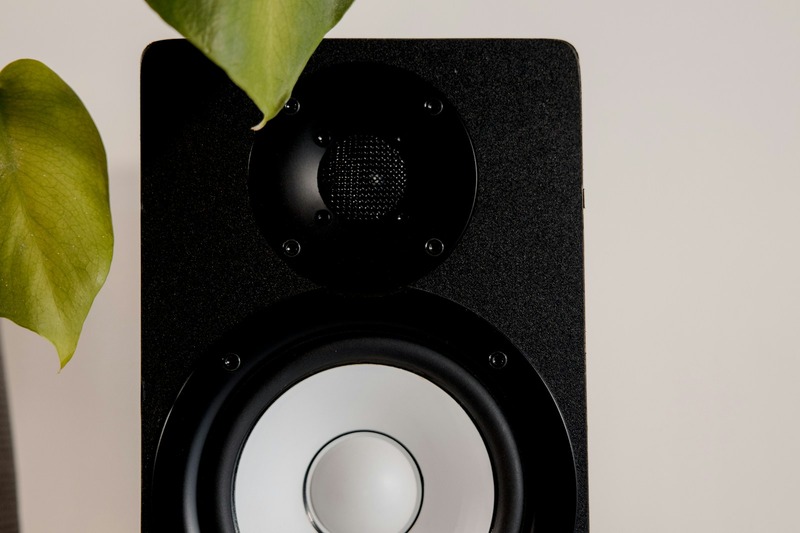
To give you a grounded assessment, I ran Ozone 11 through a standardized testing setup. My DAW is Logic Pro, running through an Apollo Twin interface and monitored on Yamaha HS8s with a sub. I chose three tracks that represent common mastering scenarios: a dense rock mix with layered guitars and a busy snare, a sparse vocal/pop track where clarity and space are everything, and an electronic piece with heavy, wide bass. Each was exported as a 24-bit WAV at 44.1 kHz. I compared Ozone 11’s results to a chain of reference masters from Ozone 10 and to a hardware chain using a Manley Vari-Mu and a Pultec-style EQ. The goal was not to beat the hardware, but to see where Ozone 11 genuinely improved the sound or workflow compared to its predecessor.
Clarity Module: Does It Actually Clean Up Your Mix?
The Clarity module is the standout new feature for anyone wrestling with messy masters. It operates by listening for two common issues: loss of transient definition and excessive resonance buildup. On the rock track, the snare had a slight wash to it—a common problem when multiple mics and room reflections pile up. Engaging Clarity with the Focus control set to —Transient— pulled the snare back into focus without making it sound brittle or clicky. The Amount control let me dial in how much processing was applied. Too much—over 60%—started to thin the low end, which killed the glue that holds a dense mix together. On the sparse vocal/pop track, I actually found Clarity was counterproductive. It sharpened the vocal, but it also removed a bit of natural room air that made the performance feel human. My takeaway: Clarity is excellent for dense, aggressive mixes where clarity is king. Use it sparingly, if at all, on sparse or acoustic work where warmth and space are more valuable than definition.
Stabilizer: How Well Does It Handle Track-to-Track Consistency?
The Stabilizer’s job is to ensure the tonal balance of one track doesn’t feel wildly different from the next when played in sequence. I tested this across the three tracks. The electronic piece had a very pronounced bass shelf, which made it sound significantly heavier than the pop track. The Stabilizer analyzed both and applied a gentle EQ correction to bring the electronic track’s low-end more in line with the pop song. It preserved the punch—the kick still had authority—but it reshaped the bass so it wasn’t overpowering the vocal in a listening session. I compared this to a manual EQ curve I’ve used for years on similar transitions, and Ozone 11’s approach was reasonable. The limitation here is that it can oversimplify creative decisions. If you want an album to have a dramatic dynamic arc—a quiet acoustic song followed by a bombastic rock anthem—the Stabilizer may try to neutralize that contrast. Best use: set it as the first module in your chain for a baseline, then override or bypass it for tracks that need to stand out.
The Revamped Master Assistant: Helpful or Just a Gimmick?
The Master Assistant works by listening to your mix and building a starting chain. On the vocal/pop track, it set a balanced initial level and a gentle EQ curve that cleared up the vocal’s upper mids. It also applied a reasonable amount of compression. But it missed a 2 dB dip in the low end that would have made the track sound hollow in a car system. I had to manually add a slight shelf to fix it. Compared to Ozone 10, the source separation in version 11 is better—it can distinguish elements with more accuracy—but the assistant is still a starting point, not a final solution. For a beginner who just needs a quick export, it’s genuinely helpful. For anyone with ears and experience, it saves time but still demands human intervention. Use it as a rough draft, then edit aggressively.
Ozone 11 vs. Ozone 10: Is It Worth the Upgrade?
Let’s break this down with a direct comparison:
- Clarity Module: Not in Ozone 10. A meaningful upgrade if you wrestle with muddy mixes.
- Stabilizer: New in 11. Useful for album projects, but Ozone 10’s EQ match feature can approximate it.
- Master Assistant: Improved source separation in 11, but the assistant in 10 is still functional.
- Standalone App: Faster load times and better UI in 11.
- CPU Usage: Higher in 11, which is a downgrade for older systems.
Cost-wise, Ozone 11 full is typically around $500, while upgrades from Ozone 10 are about $200. You can check the upgrade pricing on Amazon. My verdict: upgrade if you master dense mixes daily or work on full albums where track-to-track consistency is critical. Skip it if Ozone 10 already serves your workflow and you’re satisfied with the results. The new modules are nice, but they won’t revolutionize an already solid process.
Ozone 11 Elements vs. Standard vs. Advanced: Which Version Do You Actually Need?
Elements is the entry-level tier and frankly, too limited for serious mastering. It includes only a handful of modules and lacks the new Clarity and Stabilizer features. It’s fine for a quick export, but you’ll hit its ceiling fast. Standard is the sweet spot for most home studios. It includes Clarity, Stabilizer, the full EQ, dynamics, and the improved Master Assistant. It will handle 90% of what independent producers need. Advanced adds Spectral Shaper, a full dynamic EQ with more bands, and the ability to use individual modules as separate plugins in your DAW. This is for high-volume pros—mixing engineers who master their own projects or those who need precise control over specific frequency zones. For most readers, Standard is the right choice. Compare Standard pricing on Amazon.

Three Common Mistakes to Avoid When Using Ozone 11
Mistake 1: Over-processing the Clarity module. It’s easy to fall in love with the immediate sense of —clean— it gives. But push it past 50% on a warm mix, and you’ll suck the life out of it. Fix: use it at 20-30% on dense tracks and try bypassing it entirely on sparse ones.
Mistake 2: Relying entirely on the Stabilizer for album consistency. The Stabilizer handles tonal balance, but it ignores loudness and dynamic range. Use it for the EQ match, then manually adjust volume and compression to keep the energy consistent.
Mistake 3: Ignoring module order. Ozone is a chain, and moving the order of modules changes the sound dramatically. For example, placing Clarity after a compressor can alter how the compressor reacts. Stick with a logical order: EQ first, then dynamics, then Clarity and Stabilizer last.
Where Ozone 11 Falls Short (Honest Trade-offs)
Nothing is perfect, and Ozone 11 has clear weaknesses. The CPU usage is noticeably higher than Ozone 10—on an older MacBook Pro, real-time monitoring becomes sluggish, making fine adjustments frustrating. The standalone app, while improved, still crashes occasionally on macOS Big Sur and Monterey. iZotope has released patches, but it’s not as stable as a dedicated hardware chain. The learning curve for the new modules is steeper than advertised. The Clarity and Stabilizer have subtle controls that take a few sessions to understand intuitively. iZotope markets them as automatic, but they require a human ear to dial in. These aren’t dealbreakers, but they’re worth knowing before you invest.
Who Should Buy Ozone 11? (And Who Should Skip It)
Buy Ozone 11 if you’re a home studio producer struggling with muddy mixes that never translate well. Buy it if you master for others and need a versatile set of tools for different genres. Buy it if you’re building a Swiss Army knife of finishing tools in your DAW.
Skip it if you already own Ozone 10 and your workflow is humming. Skip it if you master primarily with analog hardware and only use software for minor tweaks. Skip it if you’re on a tight budget—free tools like YouLean Loudness Meter and your DAW’s stock EQ can teach you a lot about mastering before you spend $500.
Final Verdict: Can It Master Your Tracks?
Rating: 8/10. Ozone 11 is a powerful tool for cleaning up dense mixes and achieving album consistency with the new Stabilizer. The Clarity module is a genuine win for anyone who masters busy mixes. But it’s not a magic button—it requires critical listening and good monitoring to shine. Pair it with a treated room and an honest pair of speakers, and it will elevate your masters. If you’re on the fence, start with the free trial—or book a mastering consultation with me to see if it fits your workflow. Book a session here.